Skip to content
  1. Home
  2. Templates
  3. B2B lead generation via CRM
  4. Channels and ads
B2B lead generation via CRM

See which channels bring sales, not only leads

Leads from the site and sales from the CRM in one table, split by channel. Paid and organic traffic sit side by side, and each channel has its own lead-to-sale conversion.

For:

GrowthRevOps
Channels and ads

Questions it answers

  • Which channels bring the most sales this month?
  • Does paid traffic bring better leads than organic?
  • Which channel brings many leads but few sales?
  • Which ad campaigns bring leads that turn into sales?

What to connect

  • Website
  • CRM
  • Ad accounts

The template applies without them too: the reports fill in once the sources are connected.

What appears in the project

2 reports · 3 sections · 2 slices · 1 metric

Report: Channels

sections top to bottom, as in the product
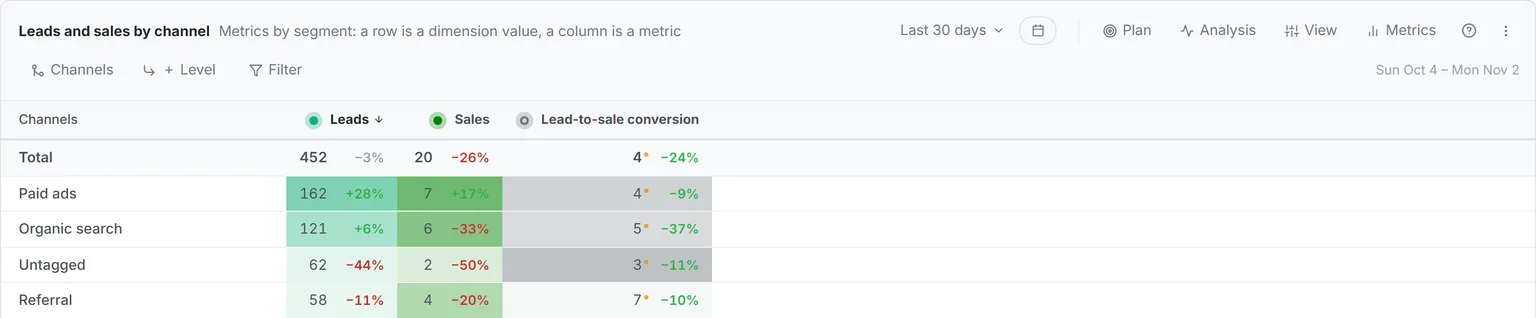
1 Leads and sales by channel Breakdown Rows: the Channels slice new
Leads and sales by channel
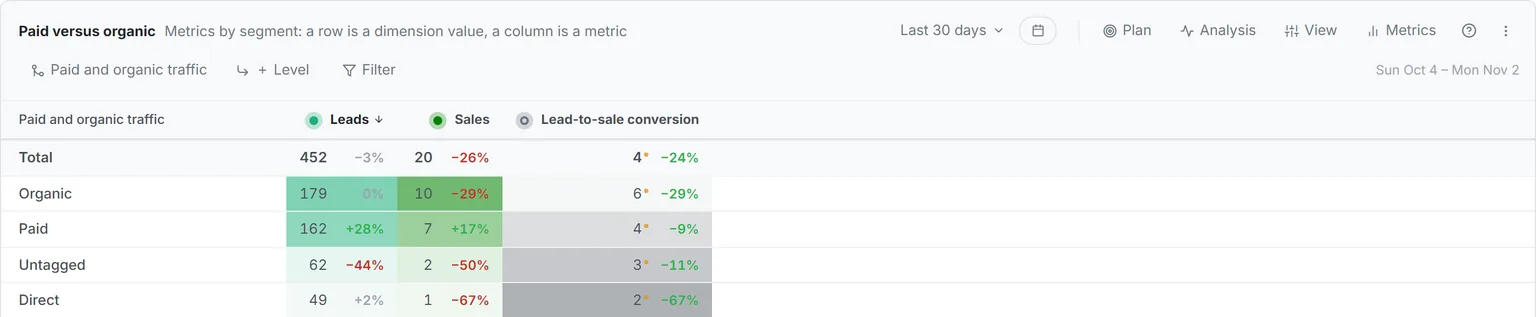
2 Paid versus organic Breakdown Rows: the Paid and organic traffic slice new
Paid versus organic

Report: Paid traffic

sections top to bottom, as in the product
3 Paid traffic campaigns Breakdown Rows: source → campaign
Paid traffic campaigns

Slice · new

Channels

Ads · Search · Social · AI · Email · Referral · Direct

Used in section

Slice · new

Paid and organic traffic

Paid · Organic · Direct · Untagged

Used in section

Metric

  • Lead-to-sale conversion — Sales / Leads × 100

If it is already there

Nothing is duplicated

A slice or a metric the project already has is reused, not created again.

How to use it

See

The same report on a demo project with data: the sections, columns and slices are the ones you get.

See it in the demo

Set up

Sign up and connect your ads and CRM. The template goes in from the Add report window with one button.

Apply in your project

Check

What to check in the report once data comes in. A number is a report section: point at it or tap it to see the section.

  • Check the channel split; a large share without a channel usually means links without tags
  • Sort channels by sales, not by leads, and compare the two orders
  • Look at lead-to-sale conversion for the channels with the most leads
  • Open the Paid traffic report to see the same numbers by campaign
FAQ

Common questions

From the visit that brought the lead: tags in the link, the referrer and the ad click. The rules are the same for the whole project.

Sales from the CRM divided by leads, as a percentage. The template adds it as a project metric, so you can see the formula in the metric catalog.

See where your revenue comes from

See what to cut, fix, and scale — using your real data.

Vitaly, co-founder of KO
Vitaly Product & sales
Azat, co-founder of KO
Azat Engineering

You'll meet the founders, not a sales rep — we built KO after years of running growth on broken numbers.

Book a free demo

One business day to schedule. No spam.

Please enter your first name.
Please enter your last name.
Please enter a valid phone number.
Please enter a valid email address.
Please enter your company name.
Please select your role.

By submitting this form, you agree that KO may contact you as described in our Privacy Policy.