Skip to content
  1. Home
  2. Solutions
  3. How to prove that a change worked?
Day report · What to do now · Plan vs actual

Did the change work? Answer with numbers against a fair baseline

Growth after a change does not prove that the change caused it. In KO, you write down what you expect as a hypothesis before the change. KO compares the metric over equal periods before and after, and a person sets the result, with "went away on its own" as one of the options. The goal, the actual numbers and the sprint review stay as numbers you can bring to a budget talk.

For: Growth

Did the change work? Answer with numbers against a fair baseline
The situation

When a quarterly report or a talk about extending the budget is coming, I want to show that a change worked, against a fair baseline, so that we defend the budget with numbers.

What changes

Without KO

With KO

The change is made, nobody wrote down what to expect, and a month later any growth can be called a success

The hypothesis is written down before the change: metric, size of the effect, confidence and when to check

Before and after are compared by eye and over different periods, and holidays confuse the picture

KO compares the metric over the check period after Done and the same number of days before it and names other hypotheses on the same metric

The metric came back on its own, the report calls it a team win, and the next plan is too high

A result has three options: worked, did not work, went away on its own

Before a budget talk, numbers are collected from three places, and each place has its own

The goal from Planning, the actual numbers and the forecast are in one Plan vs actual table, and the sprint review is saved as a snapshot

In money terms

The most expensive success is the one that came on its own

If growth that came on its own is counted as the result of a change, the next plan is built on effects that do not exist, and the budget goes where it does not work. This is why a result in KO has the option "went away on its own". The measurement suggests a result but does not set it, and the Dropped line warns you when the goal grew at the cost of another metric, if you named that metric in the hypothesis.

How it works

What to set up and what you see

See

Write down what you expect before the change

You can only prove what you expected in advance. A hypothesis in KO is a change with an expected effect: a metric and a size, from and to. Without a metric and a size it does not save, because there is nothing to check it against. You add confidence (sure, should help, a try) and when to check the effect. You can also add an early sign, a metric that moves before the goal does, and a metric that must not drop. You create a hypothesis from a What to do now finding with + Hypothesis, or directly in the Day report. A finding also has a How to verify block: the metric, the target and the period.

More about this module
Write down what you expect before the change
Check

Compare against a fair baseline

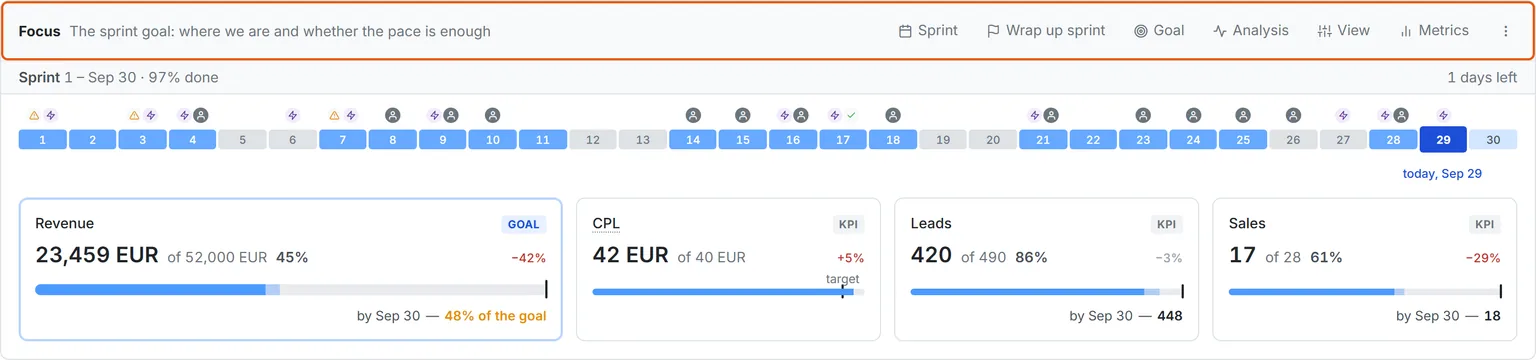
When the change is made, mark the hypothesis Done. The Measured line appears when the check period is over: it compares the metric over the check period after this mark and the same number of days before it, and the tooltip shows the dates. If other hypotheses changed the same metric on the same days, the tooltip lists them: they share one result, and the measurement cannot split it. If the early sign has not moved by its day, the Day report tells you that you can drop the hypothesis without waiting for the check date. Above it, Focus shows the sprint goal, the pace and the forecast for the last day, and the goal tile shows how much the hypotheses in progress cover.

More about this module
Compare against a fair baseline
Act

Show the result with numbers

A person sets the result of a hypothesis: worked, did not work or went away on its own. Went away on its own means that the metric came back while we did nothing, and it does not count as worked, or the next expectations will be too high. At the end of the sprint, Wrap up sprint collects the numbers for the goal and the KPIs, and Save review keeps them as a snapshot that you open later with Sprint review. For the budget talk there is Plan vs actual: the goal from the project plan, the actual numbers by week or month and the plan forecast. The Subtotal column counts the value for the columns you select.

Checks in Diagnostics
More about this module
Show the result with numbers
Setup

What to connect

  1. In Planning, create a plan: periods, a metric with the Goal role and its target for each period. KO counts the pace and the result against it
  2. Before the change, create a hypothesis: metric, size of the effect and when to check, and if you know them, an early sign and what must not drop
  3. When the change is made, mark the hypothesis Done, and set the result after the check date
  4. Before the report, add a Plan vs actual section with this plan to Reports, and wrap up the sprint at its end
FAQ

Hard questions

No. The measurement shows timing, not proof. Something else could move the metric on the same days, so the measurement only suggests a result, and a person sets it. If other hypotheses changed the same metric, the tooltip names them. What to do now findings also have a Cross-check: whether a second sign in the data backs the conclusion, and what else changed in the same window.

Went away on its own. This result does not count as worked. Otherwise the team gets used to an effect that never happened, and the next expectations are too high.

No, if the hypothesis has an early sign. This is a metric that moves before the goal, and it is checked on its own day, before the check date. If it has not moved, the Day report tells you that you can drop the hypothesis.

If you fill in What may drop when you create the hypothesis, the Day report compares that metric too. If it dropped, a Dropped line appears under the result. Before you set worked, decide whether the growth of the goal is worth this cost.

The project manager changes hypotheses and wraps up the sprint. Any member can choose the goal and the KPIs. The sprint review is saved as a snapshot and later opens read-only, so the numbers will not change before the budget talk.

Did the change work? Answer with numbers against a fair baseline

See what to cut, fix, and scale — using your real data.

Vitaly, co-founder of KO
Vitaly Product & sales
Azat, co-founder of KO
Azat Engineering

You'll meet the founders, not a sales rep — we built KO after years of running growth on broken numbers.

Book a free demo

One business day to schedule. No spam.

Please enter your first name.
Please enter your last name.
Please enter a valid phone number.
Please enter a valid email address.
Please enter your company name.
Please select your role.

By submitting this form, you agree that KO may contact you as described in our Privacy Policy.